


It is common to find organizations that still have their old PLCs that, in turn, have serial ports to communicate with others. If your processes work as you want, this should not be an inconvenience. Unfortunately, the life of the equipment is not infinite and there comes a point where they need, beyond repair, to be replaced. First problem in sight: that they no longer sell them.
There are fewer and fewer Simatic S7 300 PLCs on the market, and none of Simatic S5 for years. Therefore, if you have to replace your traditional equipment, you should look for more modern ones. Second problem detected: that these are not able to communicate with the old PLCs that you still keep in the plant.
Luckily, there is no challenge without a solution: in this case, in the form of the IBH LINK tool.
Ethernet Connectivity for your Legacy PLCs
IBH LINK provides Ethernet connection to your Siemens Simatic S7 and S5 PLCs, through the PROFIBUS, MPI and PPI port. Based on the Siemens S7 protocol (RFC 1006, ISO on TCP), this small gateway facilitates the link between your old PLCs and the most modern ones, without the need to replace all your systems due to the impossibility of communicating them.

Differential Advantages of IBH LINK
Beyond saving you the replacement of multiple systems, this gateway allows you to route your packets and configure them from wherever you want, without having to connect your PC directly to the PLC. In this way, the use of the IBH LINK provides you with great flexibility that you did not have before, giving rise to carry out, through Ethernet, the following operations:
- Program devices.
- Configure devices.
- Communicate a Windows, Linux PC with a PLC.
- Communication between PLCs.
- Communication between PLC with FDT applications.
With IBH LINK, configure your packages from anywhere in the world.
Beyond ending distance limitations, adding Ethernet functionality brings benefits such as the subsequent exploitation of the data obtained.
First, if you are in a geographical area far from the plant but with internet access, you can securely access your PLCs via a VPN to obtain information. Then, the latest generation software that you install on your PC will allow you to get the most out of your data.

For Windows operating systems (and in some cases Linux), there are examples of IT-OT communication with the Visual Basic, Visual C, Visual C++, VB.net, Visual C#, Delphi, Java or Excel languages. Once the professional in charge interprets the information on the PC, with the lines of code they choose, the application installed in each case will add its own logic (save it in a database, send alarms, etc.).
Ethernet – Ethernet Communication
HMI applications can also be connected via Siemens S7 (RFC 1006, ISO on TCP). In the same way that IBH LINKs are the answer to when it is time to replace old PLCs, if the screen you were using until now, connected by serial cable, is damaged, you lose communication with your PLC (they no longer sell them). On the contrary, current HMIs work via Ethernet, and Ethernet & MPI, for obvious reasons, do not sound like compatibility.
With the incorporation of these gateways to your old PLCs, you can maintain an Ethernet-Ethernet communication between your most modern screens and your field equipment.
Product data sheet

- S7-200 via PPI, with the IBH-Link S7++.
- S7-300 via PROFIBUS or MPI, with the IBH-Link S7++.
- S7-400 via PROFIBUS or MPI, with the IBH-Link S7+.
- PROFIBUS, MPI, PPI on the DB9 Connector.
- Ethernet with RJ45 connector.
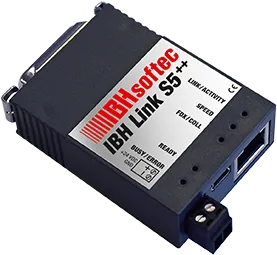
- S5-xxx via PG-Port (AS511 Protocol), with IBH-Link S5++.
- PG Port (AS511 Protocol) on the DB15 Connector.
- Ethernet on the RJ45 connector.
- Power supply: 24 Vdc.
Many of the functionalities of the IBH LINK vary depending on the configuration of the field devices, and the needs of each organization. If you need information for your particular case, do not hesitate to contact us.
Related solutions, products and ebooks:
Technical specifications
- Via OPC-Server (Windows).
- Via DDE-Server (Windows).
- Via Active-X (Windows).
- DLL function calls (Windows).
- Direct communication via TCP-Socket (Any OS System).
- Using the S5 + S7 software for Windows from IBHsoftec.
- Using Siemens Step7 software or TIA Portal.
- Simatic WinCC.
- Simatic MicroWin®.
- Simatic Step7.
- S7 for Windows.
- Protool.
- Prodave.
- VB: Visual Basic.
- VBA: Visual Basic for Applications.
- VC++: Visual C++.
- Delphi.
- Labview.
Get in Touch with an Expert
Fill in your information and we’ll contact you.